
POS Software for Pharmacy Retail Counters in the UAE
OptaPOS supports the retail side of a pharmacy: OTC products, cosmetics, baby care and wellness, with batch and expiry, shelf locations and permission controls. It is a retail POS, not a prescription, insurance or clinical system.
- English & Arabic
- VAT-ready billing workflows
- Unlimited users per location
What slows down pharmacy retail counters
Every retail category has its own pressure points. These are the ones we hear most often from pharmacy retail counters in the UAE, and how OptaPOS helps.
Expiry everywhere
Almost every item has an expiry date.
Similar product names
Many items differ only by strength or pack size.
Finding items fast
Thousands of small items across shelves and drawers.
Controlled access
Only authorised staff should adjust stock or prices.
OptaPOS features for pharmacy retail counters
Each feature below is labelled with the package or option it belongs to, so you know exactly what is included before you ask for a quote.
Batch and expiry tracking Standard
Record batch and expiry at receiving and review stock nearing its date.
Advanced item lookup (UPC, EAN, ISBN, supplier codes) Standard
Look up by EAN or supplier item number when packaging varies.
Rack, shelf and bin location Standard
Record the drawer or shelf location so staff find items fast.
Product instruction popups Standard
Show a reminder when a particular item is scanned, as your store policy requires.
Role-based permissions Standard
Limit refunds, price changes and cost visibility to the right staff.
Reorder levels and low-stock alerts Standard
Keep essential retail lines from running out.
Damage and wastage entry with reasons Standard
Write off damaged or expired stock with reasons you can audit.
Sales, payment, tax and inventory reports Standard
Detailed inventory, purchase and tax reports support buying and accounts.
Badges: Standard = included in both packages; Advanced = Advanced package; Configurable = available where configured; Multi-location = needs more than one licensed location; Paid add-on = priced separately. Compare packages
How a Pharmacy Retail Counter runs on OptaPOS
- 1
Organise the retail range
Set up retail items with barcodes, categories, brands and storage locations.
- 2
Receive with batch and expiry
Capture batch numbers and expiry dates on receiving for retail stock that requires them.
- 3
Sell with controls
Scan at the counter, show product instruction popups, and restrict sensitive actions by permission.
- 4
Keep shelves compliant with your policy
Review near-expiry items, record damaged stock and adjust only with comments.
- 5
Report clearly
Use detailed inventory, supplier and sales reports to support purchasing decisions.
Inventory for pharmacy retail counters
Health-related retail needs disciplined stock records. OptaPOS captures batch and expiry at receiving, raises reorder alerts by location, records damaged stock with reasons, requires comments and permission for adjustments, and keeps a clear supplier and cost history. OptaPOS is a retail POS: it does not include prescription, insurance-claim or clinical modules.
Customers and repeat sales
Customers return for refills and everyday health and wellness products. Customer profiles, custom fields for useful non-clinical details, purchase history and configured promotions support friendly, repeat service.
A community pharmacy uses OptaPOS for its front-of-store retail range. Batch and expiry are captured on receiving, shelf locations help staff find items, and an instruction popup reminds cashiers about age or usage notes on selected products. Only the pharmacist-in-charge role can adjust stock or prices. Prescription dispensing stays in the pharmacy’s dedicated clinical system.
This is an example workflow to show how the features fit together, not a customer case study.
Recommended hardware for a Pharmacy Retail Counter
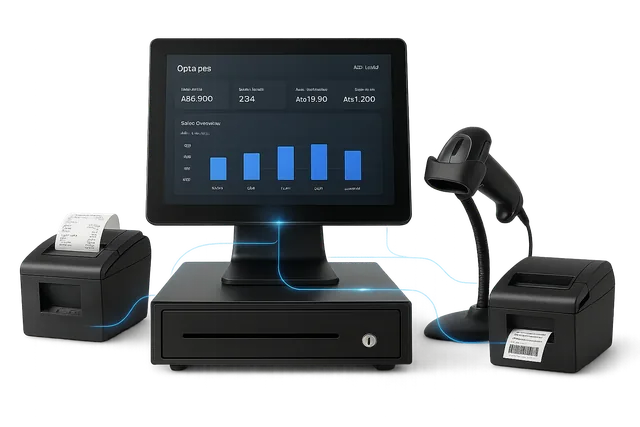
A typical counter set-up is below. Keep compatible devices you already own; we confirm compatibility during the demo and quote only what you need. No prices are listed because models and quantities vary.
- Touch POS terminal — An all-in-one touchscreen counter terminal for fast, button-driven billing. Ideal for busy counters and grid-button selling.
- Barcode scanner — Wired, wireless or hands-free 1D/2D scanners for fast checkout, receiving and stock counts.
- 80mm thermal receipt printer — Fast, quiet receipt printing with bilingual layouts where supported. Can trigger the cash drawer.
- Barcode label printer — Print price tags, barcode labels and shelf labels in bulk from OptaPOS.
- Cash drawer — A secure drawer that opens automatically on cash sales through the receipt printer.
POS checklist for pharmacy retail counters
- Batch and expiry capture at receiving
- Reorder levels and low-stock alerts
- Permission-controlled adjustments with comments
- Damage stock with reasons
- Supplier receiving and cost history
- Clear scope: retail POS, not a clinical system
Standard or Advanced?
Standard already covers inventory, variants, purchasing, staff controls and reports for pharmacy retail counters. Choose Advanced if you also want promotions and coupons, advanced loyalty, gift cards or 40+ AI-assisted reports. Both include unlimited users, customers and transactions per licensed location.
Unlimited usage for your pharmacy retail counters
Under each licensed physical location, OptaPOS does not cap the everyday things that grow with a healthy business. Add cashiers, serve more customers and sell from more devices without a new bill each time.
Subscription charges are based primarily on physical locations. Adding another store, branch, outlet or warehouse is licensed separately; adding a user or a device under an existing licensed location is not. Device use is subject to permissions and supported workflows. How pricing works
Questions from pharmacy retail counters
Does OptaPOS handle prescriptions or insurance claims?
No. OptaPOS is a retail POS for front-of-store products. Prescription, insurance and clinical workflows require a dedicated pharmacy system.
Can I track expiry by batch?
Yes, batch and expiry tracking is available in both packages.
Can I show warnings for certain products?
Yes. Instruction popups can display a message when selected items are added to a sale.
Does OptaPOS include prescription or insurance modules for pharmacy retail counters?
No. OptaPOS is a retail POS covering sales, inventory, batch/expiry, purchasing, customers and reporting. It does not provide prescription management, insurance claims or clinical functions.
Can we track batch numbers and expiry?
Yes. Batch and expiry tracking records details during purchasing and receiving and supports expiry-related reporting.
Can we restrict who changes stock?
Yes. Stock adjustments require comments and are permission-controlled, and role-based permissions decide who can refund, discount or see cost.
How is OptaPOS priced?
Subscription charges are based primarily on the number of licensed physical locations, such as stores, branches, outlets or warehouses. Under each licensed location, normal users, customers and sales transactions are unlimited, and the system can be used from compatible devices. Prices are shared in a tailored quote.
Do I need to buy new hardware?
Not always. OptaPOS runs in a web browser on compatible desktops, laptops, POS terminals, tablets and smartphones. Our team checks your existing scanners, printers and cash drawers during the demo and recommends only what is missing.
Explore OptaPOS for Pharmacy Retail Counters Across the UAE
Where we have published a local guide for pharmacy retail counters, the link opens it. Other locations open the area page, with how we support stores there.
Similar retail businesses
Useful features and guides
See OptaPOS set up for a Pharmacy Retail Counter.
Book a live demo with products like yours. We will show checkout, stock and reports for pharmacy retail counters and recommend the right package and hardware.