
POS Software for Jewellery Shops in the UAE
In jewellery, every piece is high value and many are unique. OptaPOS tracks pieces individually with photos and detailed descriptions, limits who can discount or adjust stock, approves which devices can sign in and keeps an audit trail of sensitive actions.
- English & Arabic
- VAT-ready billing workflows
- Unlimited users per location
What slows down jewellery shops
Every retail category has its own pressure points. These are the ones we hear most often from jewellery shops in the UAE, and how OptaPOS helps.
Unique, high-value pieces
Each item needs its own record, photo and details.
Security and access
Only trusted staff and devices should touch prices and stock.
Negotiated discounts
Bargaining is common but must stay within limits.
Daily counts
Display trays are checked every opening and closing.
OptaPOS features for jewellery shops
Each feature below is labelled with the package or option it belongs to, so you know exactly what is included before you ask for a quote.
Serial number / IMEI entry Standard
Identify individual pieces or watches by serial or item number.
Multiple images, phone-camera capture and auto-compression Standard
Several photos per piece help confirm the exact item.
Detailed product descriptions on receipts Standard
Record stones, materials or movement details and print them if needed.
Role-based permissions Standard
Decide who can see cost, refund or change prices.
Registered-device approval Standard
Only administrator-approved devices can open the system.
Activity and audit visibility Configurable
Review activity where supported to follow up on unusual actions.
Employee-level maximum discount Standard
Cap discounts per salesperson on high-value pieces.
Physical stock count and variance review Standard
Count pieces regularly and review variances before posting.
Bill-wise and item-wise salesperson attribution Standard
Credit the right person for every piece sold.
Badges: Standard = included in both packages; Advanced = Advanced package; Configurable = available where configured; Multi-location = needs more than one licensed location; Paid add-on = priced separately. Compare packages
How a Jewellery Shop runs on OptaPOS
- 1
Record each piece
Create items with serial or item identification, multiple photos and detailed descriptions.
- 2
Secure the counter
Approve the devices that may access the system and restrict actions by role and branch.
- 3
Sell with attribution
Credit the salesperson for each piece and keep discounts within employee and item limits.
- 4
Serve clients personally
Keep client preferences in custom fields and print gift receipts without prices.
- 5
Audit regularly
Count stock, review adjustments with comments and check activity where supported.
Inventory for jewellery shops
High-value retail needs piece-level control. OptaPOS supports serial/item identification, multiple images and detailed descriptions per piece, location-wise stock, permission-controlled adjustments with mandatory comments, and physical counts with variance review. Weight- or gold-rate-based pricing is not claimed; we confirm your pricing method during the demo.
Customers and repeat sales
Relationships drive high-value retail. Customer custom fields capture occasions and preferences, purchase history supports personal follow-up, gift receipts make gifting discreet, and salesperson attribution recognises the people who build those relationships.
A jewellery shop in the Gold Souk area records each necklace and ring with a unique code, photos and a description of metal, purity, weight and stones. Only the manager’s role can change prices, and new devices must be approved before staff can sign in. Each evening, staff count display trays, and the audit log shows any voids or discounts during the day.
This is an example workflow to show how the features fit together, not a customer case study.
Recommended hardware for a Jewellery Shop
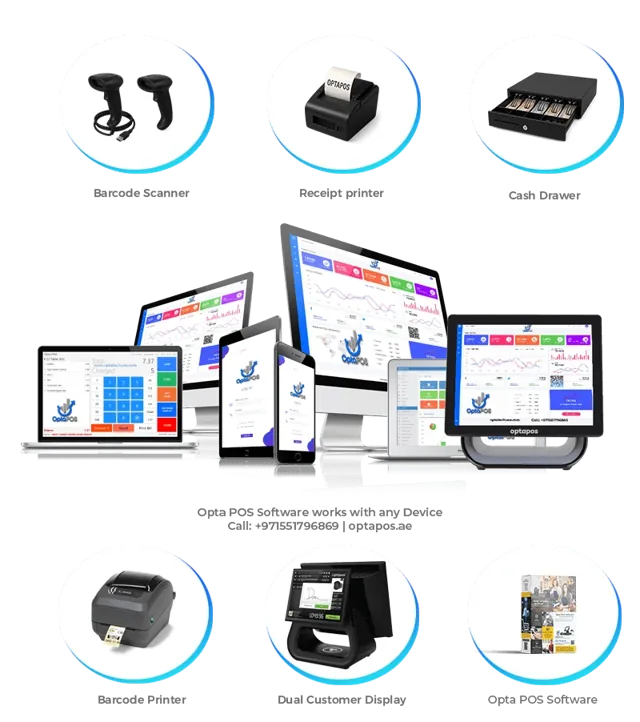
A typical counter set-up is below. Keep compatible devices you already own; we confirm compatibility during the demo and quote only what you need. No prices are listed because models and quantities vary.
- Touch POS terminal — An all-in-one touchscreen counter terminal for fast, button-driven billing. Ideal for busy counters and grid-button selling.
- Barcode scanner — Wired, wireless or hands-free 1D/2D scanners for fast checkout, receiving and stock counts.
- Barcode label printer — Print price tags, barcode labels and shelf labels in bulk from OptaPOS.
- 80mm thermal receipt printer — Fast, quiet receipt printing with bilingual layouts where supported. Can trigger the cash drawer.
- Cash drawer — A secure drawer that opens automatically on cash sales through the receipt printer.
POS checklist for jewellery shops
- Serial or item-level identification
- Registered-device approval
- Detailed permissions and branch restrictions
- Employee and item maximum discounts
- Salesperson attribution
- Audit visibility and controlled adjustments
Standard or Advanced?
Standard already covers inventory, variants, purchasing, staff controls and reports for jewellery shops. Choose Advanced if you also want promotions and coupons, advanced loyalty, gift cards or 40+ AI-assisted reports. Both include unlimited users, customers and transactions per licensed location.
Unlimited usage for your jewellery shops
Under each licensed physical location, OptaPOS does not cap the everyday things that grow with a healthy business. Add cashiers, serve more customers and sell from more devices without a new bill each time.
Subscription charges are based primarily on physical locations. Adding another store, branch, outlet or warehouse is licensed separately; adding a user or a device under an existing licensed location is not. Device use is subject to permissions and supported workflows. How pricing works
Questions from jewellery shops
Does OptaPOS calculate gold price by daily rate?
OptaPOS does not include a live gold-rate or making-charge calculator. Prices can be updated as needed, and making charges can be added as service items. We review your pricing method during a demo.
Can I restrict sign-in to approved devices?
Yes. Device approval requires new devices to be approved before use.
Is there an audit trail?
Yes. Audit and activity logs record sensitive actions such as voids, discounts and adjustments.
Does OptaPOS calculate gold rates or weight-based jewellery prices?
We do not claim gold-rate or weight-based jewellery pricing. OptaPOS manages piece-level items, images, descriptions, permissions and reporting. We review your pricing method during the demo and tell you plainly what fits.
How do we stop unauthorised access?
Registered-device approval means a device can access the system only after an administrator approves it, and role and branch permissions control what each employee can do.
Can we keep client preferences?
Yes. Up to 10 customer custom fields can store details such as preferences, occasions or sizes, using text, dropdown, date, image or file fields.
How is OptaPOS priced?
Subscription charges are based primarily on the number of licensed physical locations, such as stores, branches, outlets or warehouses. Under each licensed location, normal users, customers and sales transactions are unlimited, and the system can be used from compatible devices. Prices are shared in a tailored quote.
Do I need to buy new hardware?
Not always. OptaPOS runs in a web browser on compatible desktops, laptops, POS terminals, tablets and smartphones. Our team checks your existing scanners, printers and cash drawers during the demo and recommends only what is missing.
Explore OptaPOS for Jewellery Shops Across the UAE
Where we have published a local guide for jewellery shops, the link opens it. Other locations open the area page, with how we support stores there.
Similar retail businesses
Useful features and guides
See OptaPOS set up for a Jewellery Shop.
Book a live demo with products like yours. We will show checkout, stock and reports for jewellery shops and recommend the right package and hardware.