
Your store, on your phone
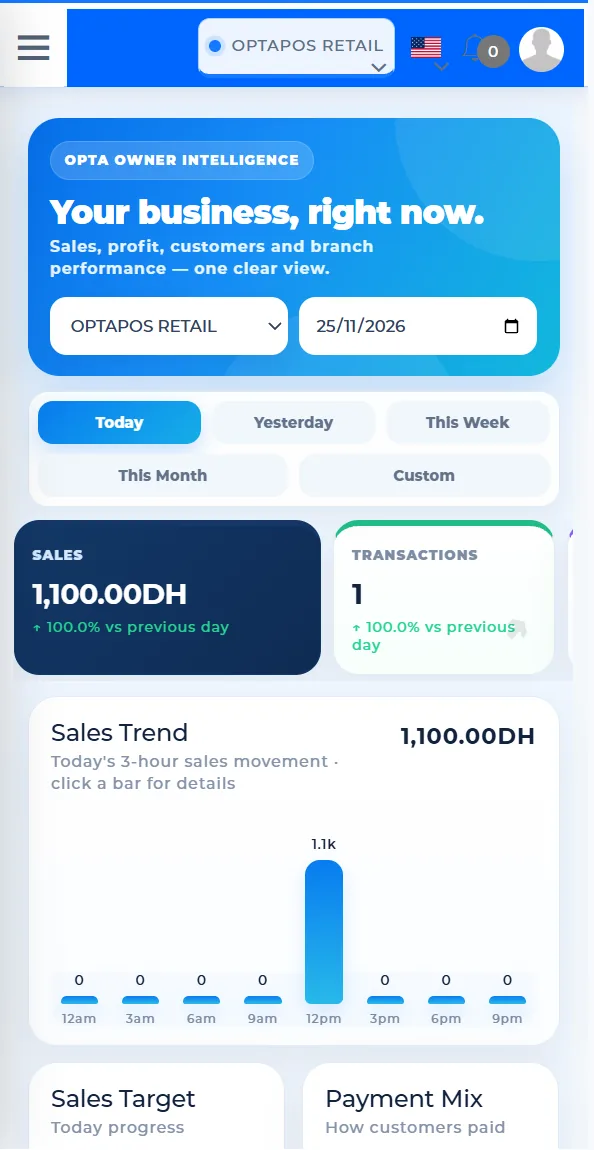
See today’s sales and payment mix from anywhere, and use your phone camera to add product photos.
- Today’s sales and payment mix
- Alerts while you are away
- Branch switching for managers
In short
Because OptaPOS is cloud-based, owners and managers can open it on a compatible phone. The mobile dashboard shows today’s sales, payment mix and key alerts, authorised users can switch branches, and in both packages the phone camera can capture product photos directly while adding or editing items.
What you can do
Package labels show where each capability is included.
Dashboards on connected devices Standard
Authorised users can check sales and key figures from compatible phones, tablets and computers.
Cloud access from compatible devices Standard
Use the same licensed location from desktops, laptops, POS terminals, tablets and smartphones, subject to permissions.
Multiple images, phone-camera capture and auto-compression Standard
Add several photos per item, capture them directly with a compatible phone camera, and let the system compress them automatically.
Quick branch switching with colour cues Multi-location
Authorised administrators switch branches quickly, and different header colours per branch reduce selection mistakes.
Detailed sales-summary report Standard
Bring the key transaction information for a period together in one report.
Check other-branch stock from the sales screen Standard
Click an item name while selling to view stock across permitted locations, subject to employee permissions.
From set-up to daily use
Open
Sign in from a compatible phone browser.
Check
Review today’s figures and alerts.
Act
Call the store, approve, or plan the next order.
Popular with these retailers
Pay for locations, not for logins.
Under each licensed physical location, OptaPOS does not cap the everyday things that grow with a healthy business. Add cashiers, serve more customers and sell from more devices without a new bill each time.
Subscription charges are based primarily on physical locations. Adding another store, branch, outlet or warehouse is licensed separately; adding a user or a device under an existing licensed location is not. Device use is subject to permissions and supported workflows. How pricing works
Common questions
Is there a mobile app?
OptaPOS works through the browser on compatible phones; ask us about the latest mobile options.
Can I sell from a phone?
The phone is mainly for monitoring and photos; for selling we recommend a terminal or tablet with a scanner and printer.
Is mobile access secure?
It uses your OptaPOS user account and permissions, and device approval can be enabled.
Related features and guides
See OptaPOS running with your products.
Book a live demo and we will walk through checkout, stock and reports using your kind of store, then recommend Standard or Advanced and the hardware you actually need.