
POS Software for Multi-branch Retail Chains in the UAE
Chains need one source of truth across every branch. OptaPOS gives you a central warehouse, transfers, location-specific pricing and promotions, a shared customer database, branch permissions and combined reporting, priced per licensed location.
- English & Arabic
- VAT-ready billing workflows
- Unlimited users per location

What slows down multi-branch retail chains
Every retail category has its own pressure points. These are the ones we hear most often from multi-branch retail chains in the UAE, and how OptaPOS helps.
Fragmented data
Each branch reports differently.
Stock imbalance
One branch overstocks while another runs out.
Price and promo control
Head office needs consistent pricing with local exceptions.
Access control
Staff should only see their branch.
OptaPOS features for multi-branch retail chains
Each feature below is labelled with the package or option it belongs to, so you know exactly what is included before you ask for a quote.
Central warehouse purchasing Multi-location
Purchase centrally and supply each branch.
Stock transfers between locations Multi-location
Balance stock between branches as demand shifts.
Branch-specific product availability Multi-location
Allow or block the sale of selected products at specific locations.
Location-specific prices and maximum discounts Standard
Price differently by branch where needed.
Branch-specific promotions Advanced
Run a promotion only in the branches you choose.
Centralised customer database Multi-location
One customer database across all branches.
Location-level employee access Multi-location
Staff see only their branch, with different permissions per location.
Location-wise and combined reports Multi-location
Compare one, several or all branches in the same report.
Inventory-by-location report Multi-location
See every product’s stock across branches in one row.
Internal messaging by location and employee Multi-location
Message a branch or an employee from inside the system.
Badges: Standard = included in both packages; Advanced = Advanced package; Configurable = available where configured; Multi-location = needs more than one licensed location; Paid add-on = priced separately. Compare packages
How a Multi-Branch Retail Chain runs on OptaPOS
- 1
Centralise the catalogue
Maintain one product list with categories, pack sizes and branch availability.
- 2
Buy and distribute
Purchase through a central warehouse, receive in bulk and transfer to stores.
- 3
Sell consistently
Branch-specific prices, receipts, taxes and promotions keep every store aligned.
- 4
Control people and access
Assign staff to locations with branch-level permissions and quick switching for admins.
- 5
Compare and decide
Combined and location-wise reports compare branches side by side.
Inventory for multi-branch retail chains
Multi-category and multi-branch retail needs one source of truth. OptaPOS provides multi-unit codes, central warehouse purchasing, branch and direct transfers, location-wise reorder levels, branch-specific product availability, a centralised stock view and an inventory-by-location report that puts each branch in its own column with the combined total.
Customers and repeat sales
Chains grow by keeping customers across every branch. A centralised customer database, customer price levels where configured, branch-specific promotions and loyalty give shoppers the same experience wherever they buy.
A seven-branch chain runs a central warehouse in Dubai Investments Park. Branches request stock and transfers are tracked end to end. Head office sets prices with exceptions for two airport-area branches, staff only see their own branch, and the combined report compares all branches every morning.
This is an example workflow to show how the features fit together, not a customer case study.
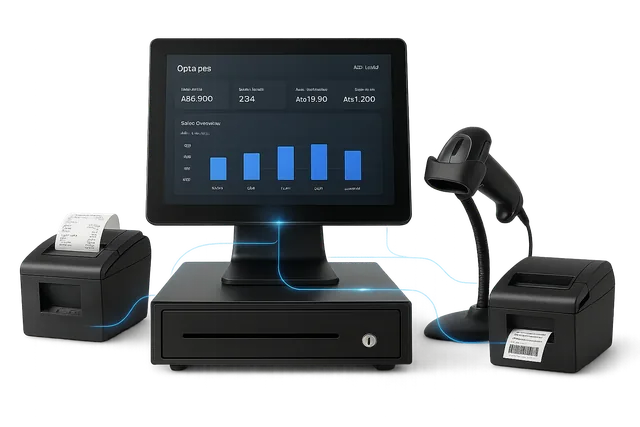
Recommended hardware for a Multi-Branch Retail Chain
A typical counter set-up is below. Keep compatible devices you already own; we confirm compatibility during the demo and quote only what you need. No prices are listed because models and quantities vary.
- Touch POS terminal — An all-in-one touchscreen counter terminal for fast, button-driven billing. Ideal for busy counters and grid-button selling.
- Barcode scanner — Wired, wireless or hands-free 1D/2D scanners for fast checkout, receiving and stock counts.
- 80mm thermal receipt printer — Fast, quiet receipt printing with bilingual layouts where supported. Can trigger the cash drawer.
- Cash drawer — A secure drawer that opens automatically on cash sales through the receipt printer.
- Customer display — Shows items, totals and VAT to the customer during checkout for transparency.
- Barcode label printer — Print price tags, barcode labels and shelf labels in bulk from OptaPOS.
POS checklist for multi-branch retail chains
- Central warehouse and branch transfers
- Branch-wise prices, taxes and receipts
- Employee and location permissions
- Centralised customers and branch promotions
- Combined and inventory-by-location reports
- Internal messaging and quick branch switching
Standard or Advanced?
Standard already covers inventory, variants, purchasing, staff controls and reports for multi-branch retail chains. Choose Advanced if you also want promotions and coupons, advanced loyalty, gift cards or 40+ AI-assisted reports. Both include unlimited users, customers and transactions per licensed location.
Unlimited usage for your multi-branch retail chains
Under each licensed physical location, OptaPOS does not cap the everyday things that grow with a healthy business. Add cashiers, serve more customers and sell from more devices without a new bill each time.
Subscription charges are based primarily on physical locations. Adding another store, branch, outlet or warehouse is licensed separately; adding a user or a device under an existing licensed location is not. Device use is subject to permissions and supported workflows. How pricing works
Questions from multi-branch retail chains
How is a chain priced?
Per physical licensed location. Users, customers, transactions and compatible devices are unlimited within each location.
Can staff be limited to their branch?
Yes. Location permissions control which branches each employee can access.
Can I see all branches in one report?
Yes. Combined and inventory-by-location reports cover all licensed locations.
How is a multi-location setup charged for multi-branch retail chains?
Charges are based primarily on the number of licensed physical locations, such as stores, branches, outlets or warehouses. Users, transactions, customers and compatible devices under each licensed location are unlimited.
Can each branch have different prices and receipts?
Yes. Branch-wise prices, receipt layouts (logo, address, barcode, description, footer), bill numbering and tax settings are part of the multi-location capability.
Can head office see all branches together?
Yes. Combined reports cover selected or all branches, and the inventory-by-location report shows every product with each branch’s stock and the total.
How is OptaPOS priced?
Subscription charges are based primarily on the number of licensed physical locations, such as stores, branches, outlets or warehouses. Under each licensed location, normal users, customers and sales transactions are unlimited, and the system can be used from compatible devices. Prices are shared in a tailored quote.
Do I need to buy new hardware?
Not always. OptaPOS runs in a web browser on compatible desktops, laptops, POS terminals, tablets and smartphones. Our team checks your existing scanners, printers and cash drawers during the demo and recommends only what is missing.
Explore OptaPOS for Multi-branch Retail Chains Across the UAE
Where we have published a local guide for multi-branch retail chains, the link opens it. Other locations open the area page, with how we support stores there.
Similar retail businesses
Useful features and guides
See OptaPOS set up for a Multi-Branch Retail Chain.
Book a live demo with products like yours. We will show checkout, stock and reports for multi-branch retail chains and recommend the right package and hardware.