
POS Software for Office Supplies Stores in the UAE
Office suppliers sell to businesses that order regularly and expect quotations, invoices and account terms. OptaPOS supports these workflows where configured, with pack and carton units and reorder alerts for core items.
- English & Arabic
- VAT-ready billing workflows
- Unlimited users per location

What slows down office supplies stores
Every retail category has its own pressure points. These are the ones we hear most often from office supplies stores in the UAE, and how OptaPOS helps.
B2B buying
Companies need quotations and invoices.
Repeat orders
The same paper and toner monthly.
Pack units
Paper by ream or carton.
Credit terms
Accounts need monitoring.
OptaPOS features for office supplies stores
Each feature below is labelled with the package or option it belongs to, so you know exactly what is included before you ask for a quote.
Quotations by print, email or WhatsApp Configurable
Quote school book lists or office supply orders.
Customer credit / store account Configurable
Where configured, sell to approved customers on account and track their outstanding balances.
Multi-unit items (piece, box, carton) Standard
Sell a single pen, a pack or a box with separate codes.
Price levels and customer-specific pricing Configurable
Give schools and offices agreed pricing, where configured.
Customer profiles and purchase history Standard
Keep contact details and a full purchase history for every customer, with no limit on customer count.
Reorder levels and low-stock alerts Standard
Keep everyday essentials from running out.
Email receipts and invoices Standard
Send a copy of the receipt or invoice to the customer’s email instead of, or as well as, printing it.
Brand and manufacturer tracking Standard
Report stationery and toys by brand or publisher.
Badges: Standard = included in both packages; Advanced = Advanced package; Configurable = available where configured; Multi-location = needs more than one licensed location; Paid add-on = priced separately. Compare packages
How a Office Supplies Store runs on OptaPOS
- 1
Catalogue by code
Import titles and items with ISBN, UPC or EAN, categories, brands and images.
- 2
Prepare for the season
Receive back-to-school or holiday stock in bulk and tag it for reporting.
- 3
Sell singles and packs
Scan single items or packs with separate codes, and quote school or office lists.
- 4
Keep the range topped up
Low-stock alerts and branch transfers keep popular lines available.
- 5
Clear what does not sell
Worst-selling and dead-stock reports show what to return, discount or stop ordering.
Inventory for office supplies stores
These stores carry thousands of small items and titles with sharp seasonal peaks. OptaPOS supports ISBN/UPC/EAN lookup, unlimited subcategories, multi-unit codes for packs and boxes, bulk Excel receiving, seasonal tags, reorder alerts by location and branch transfers.
Customers and repeat sales
Families, schools and offices buy again every term. Customer records, quotations for lists and bulk orders, customer price levels for institutions where configured, and loyalty for regular readers help you win repeat business.
An office supplies store sells A4 paper by ream or carton, quotes a company’s quarterly order and bills it to the company account where configured. Reorder alerts keep toner and paper in stock, and the customer’s purchase history makes repeat orders quick.
This is an example workflow to show how the features fit together, not a customer case study.
Recommended hardware for a Office Supplies Store
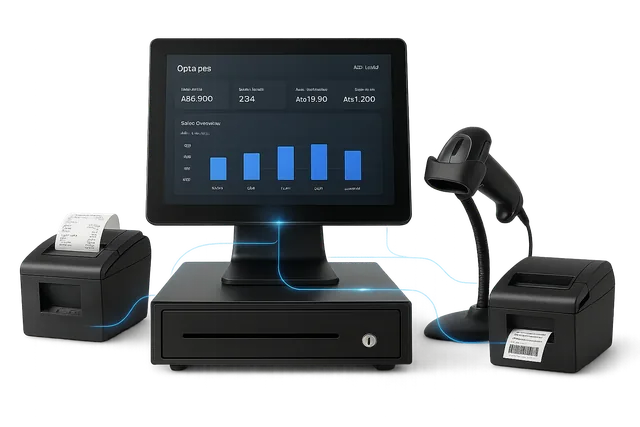
A typical counter set-up is below. Keep compatible devices you already own; we confirm compatibility during the demo and quote only what you need. No prices are listed because models and quantities vary.
- Touch POS terminal — An all-in-one touchscreen counter terminal for fast, button-driven billing. Ideal for busy counters and grid-button selling.
- Barcode scanner — Wired, wireless or hands-free 1D/2D scanners for fast checkout, receiving and stock counts.
- 80mm thermal receipt printer — Fast, quiet receipt printing with bilingual layouts where supported. Can trigger the cash drawer.
- Barcode label printer — Print price tags, barcode labels and shelf labels in bulk from OptaPOS.
- Cash drawer — A secure drawer that opens automatically on cash sales through the receipt printer.
POS checklist for office supplies stores
- ISBN, UPC and EAN lookup
- Unlimited subcategories for deep ranges
- Pack and box codes
- Bulk receiving for seasonal stock
- Quotations for school and office lists
- Top/worst-selling and dead-stock reports
Standard or Advanced?
Standard already covers inventory, variants, purchasing, staff controls and reports for office supplies stores. Choose Advanced if you also want promotions and coupons, advanced loyalty, gift cards or 40+ AI-assisted reports. Both include unlimited users, customers and transactions per licensed location.
Unlimited usage for your office supplies stores
Under each licensed physical location, OptaPOS does not cap the everyday things that grow with a healthy business. Add cashiers, serve more customers and sell from more devices without a new bill each time.
Subscription charges are based primarily on physical locations. Adding another store, branch, outlet or warehouse is licensed separately; adding a user or a device under an existing licensed location is not. Device use is subject to permissions and supported workflows. How pricing works
Questions from office supplies stores
Can companies buy on account?
Where configured, yes.
Can I repeat a previous order quickly?
Purchase history shows previous orders, and quotations can be reused as a starting point.
Do you integrate with procurement systems?
No. OptaPOS does not offer ERP or procurement integrations.
Can office supplies stores scan ISBN barcodes?
Yes. Advanced item lookup supports ISBN, UPC and EAN, along with supplier item numbers and multi-unit codes.
Can we handle the back-to-school rush?
Bulk receiving, seasonal tags, quotations for lists, reorder alerts and fast barcode checkout are designed for high-volume seasonal periods.
Can schools or offices get special prices?
Where configured, customer price levels apply agreed pricing to institutional customers, and quotations can be shared before the order.
How is OptaPOS priced?
Subscription charges are based primarily on the number of licensed physical locations, such as stores, branches, outlets or warehouses. Under each licensed location, normal users, customers and sales transactions are unlimited, and the system can be used from compatible devices. Prices are shared in a tailored quote.
Do I need to buy new hardware?
Not always. OptaPOS runs in a web browser on compatible desktops, laptops, POS terminals, tablets and smartphones. Our team checks your existing scanners, printers and cash drawers during the demo and recommends only what is missing.
Explore OptaPOS for Office Supplies Stores Across the UAE
Where we have published a local guide for office supplies stores, the link opens it. Other locations open the area page, with how we support stores there.
Similar retail businesses
Useful features and guides
See OptaPOS set up for a Office Supplies Store.
Book a live demo with products like yours. We will show checkout, stock and reports for office supplies stores and recommend the right package and hardware.